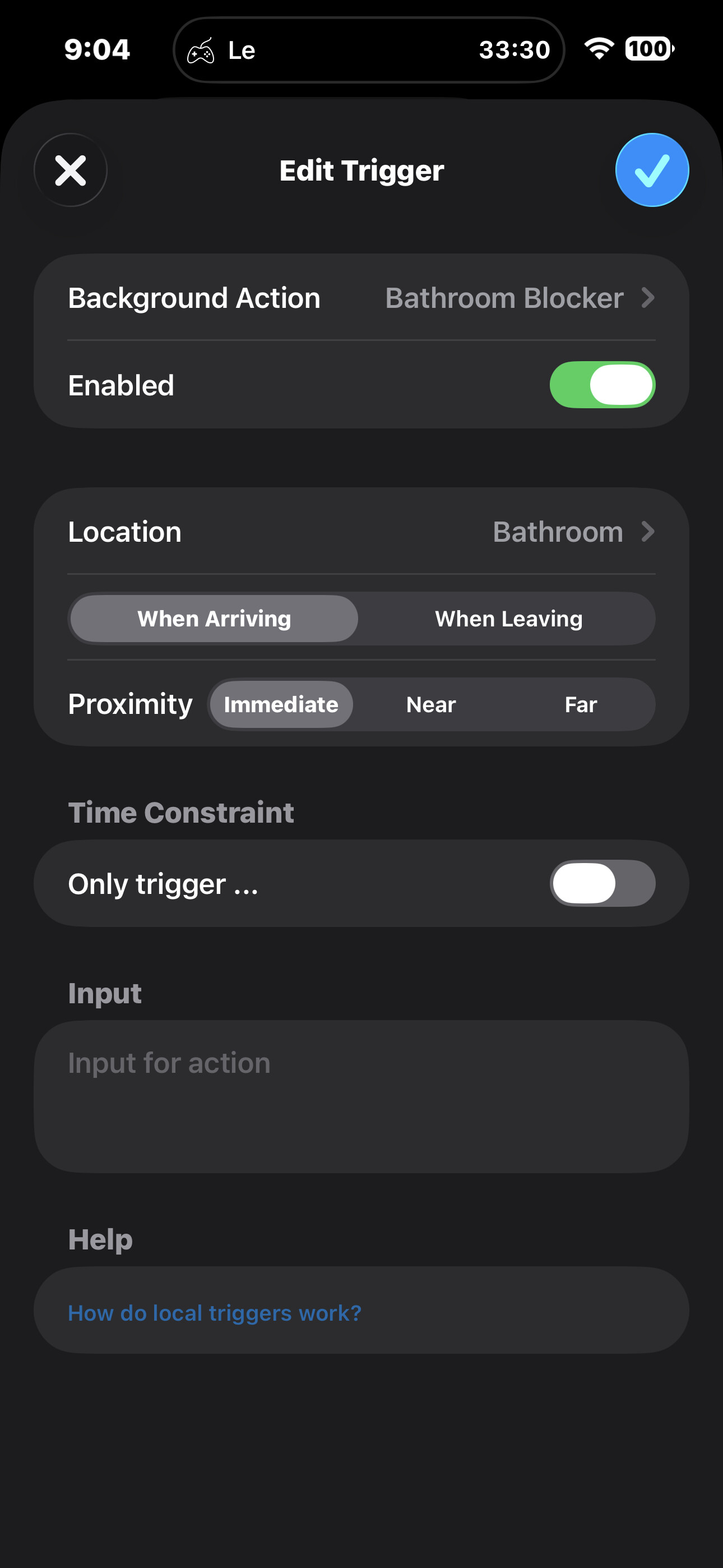
I will start by saying I have already reviewed this forum and made sure I tried all the advice and tips on getting the background actions to trigger. But I will still provide all the information and steps I have taken, along with the consistent findings from my experiments.
To start, I am setting up two separate local triggers that use a USB-powered iBeacon device. I am able to get the notification and background action to work when arriving at an immediate distance using an old iPhone as an Automation Server, but only when Pushcut is open on my device. As soon as Pushcut is in the background, it stops receiving my location and does not trigger either of the triggers, unless there is currently a notification up from Pushcut for that location trigger occurring, in which case it appears to work approximately three times before it will no longer trigger while out of the app.
So, here is what I have tried. I started by ensuring that Location Services are set to Always with Precise Location, and that other apps can access my location in the background, such as Pokémon Go. Next, I ensured that Background App Refresh was enabled globally on my iPhone and specifically for Pushcut. The next step was to change the beacon’s UUID and the major and minor values, but again, it did not help. I made sure my device was at 80% battery and not in Low Energy Mode. Afterward, I tried to forcefully quit and reopen Pushcut, then deleted Pushcut and redownloaded it. After that, I powered off my iPhone, and when that did not work, I reset Location Services and Privacy in Settings and reconfigured the location settings to the ones mentioned earlier. At this point, my read on the situation is that for some reason I am unsure of, the iBeacon is not being detected when Pushcut is not open on my device, when the app does have location services active through opening the app, or it is still actively using them, it is able to work correctly, but when it is in the background, despite that being how it seemingly should work given what other people are saying.
My questions, then, are these: how should I fix the issue so that the iBeacon Location trigger activates in the background, or which other Application should I use to detect an iBeacon on my iPhone and then, from there, trigger a shortcut?
Could you show us a screenshot of your trigger’s config (if you’re not comfortable sending it here, you can email it to feedback@pushcut.io)?
Does the trigger work if you set proximity to “Far”? That mode bypasses any internal distance checks and just triggers a notification as soon as the beacon is detected.
Could you elaborate on what you mean by “currently a notification up”?
For context, the iBeacon is used to trigger my server to ultimately limit app usage when I approach, helping curtail excessive time spent on apps while in the bath/on the toilet. It does this by triggering a shortcut on the Automation server that texts me, and that triggers a Shortcut Automation on my main iPhone, which blocks the Apps.
For reference, this is the same config for the notification and background action. I have not checked it with Far, but I will check Far to see if that works. I will say that I believe it can detect the beacon in the background because I set a timed notification for “when at Bathroom” the iBeacon did trigger when not in Pushcut.
To elaborate on “currently a notification up” I mean that when Pushcut is open, it is getting the precise location and triggering the notification, as well as the Server Action, and that after putting the app in the background as this is happening, the app appears to keep working as I quickly left and then approached the iBeacon again while the notification was still visible on the screen “up” (and the precise location still being actively tracked despite the app being in the background) and despite the app being in the background, it activated. I’m guessing that the location is still being considered actively in use. However, after the second time of doing this with Pushcut closed, it stopped working. Let me know if there is any more information on this specific situation that can help you understand what is going on!
Hey! Finally got around to trying out the proximity at “Far” and it did trigger correctly on “Far” so it is something about being in the background and distance checking it seems like.
I have done some further testing. I set the iBeacon to be much weaker using just “far” triggers, and while it works for the notification, it is not triggering the Background Local Trigger. I know that the action can work, as I attached it to a notification and activated it manually. But any way to fix or change it so that it works properly while Pushcut is in the background would be great.